Comparison
Available on all plansThe finalists side by side — same yardstick, one clear call.
What is Comparison?
When the shortlist is down to a few favorites, comparison lines them up side by side — prices, areas, scores and the distance to your key locations, measured the same way and set against your whole mission, not just against each other. Each one keeps its own identity color across every view, so nothing gets mixed up.
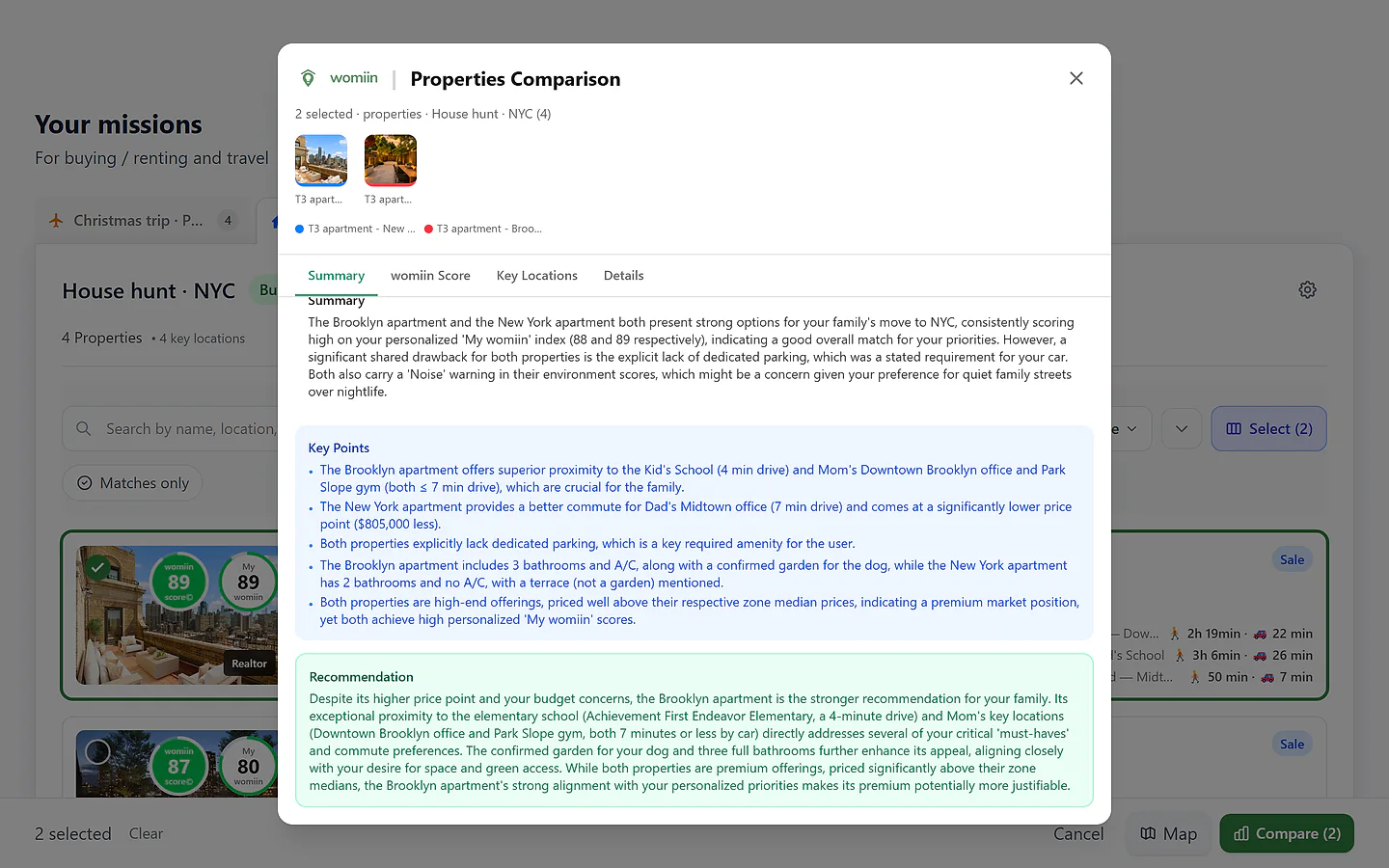
Side by side, at a glance
The Martins' finalists — two scores, two prices, one lean.
And because a table can't weigh everything, the AI synthesis (Plus and Pro) reads the whole picture — who's in the household, your context and preferences, My womiin, the travel to each key location, how each price sits against its local market — and tells you where it leans, and why.
Four views, one comparison
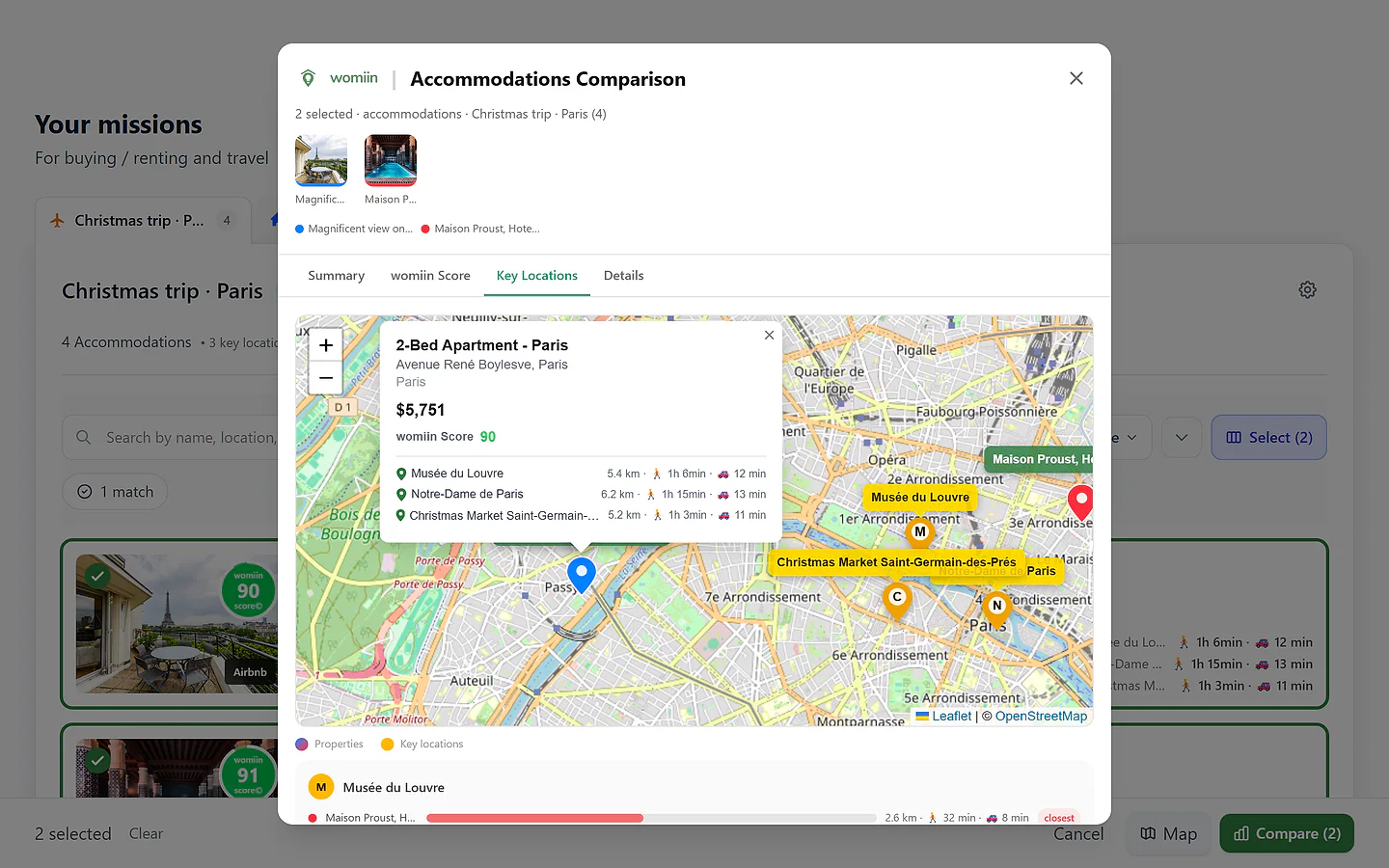
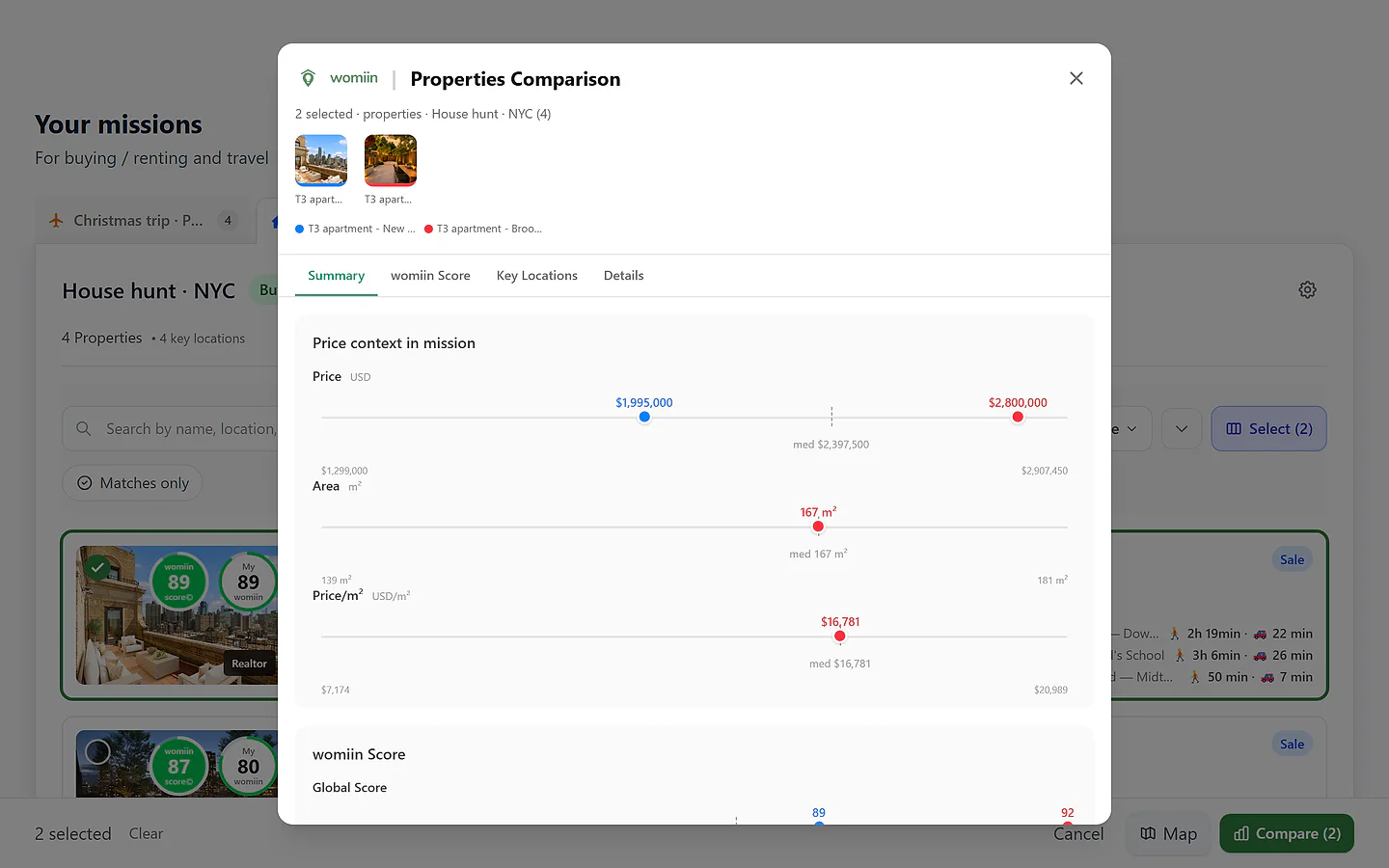
The overview, the score, your key locations on one map, and the full details grid — switch views without losing the thread.
The same yardstick
Every one is measured the same way, and plotted against your whole mission's median — a fair fight, not a feeling.
Decide together
Everyone in the mission sees the same comparison — your partner, your family, whoever's deciding with you.
Homes and stays both compare
The side-by-side adapts to the mission — the yardstick doesn't.
Comparing homes
Long-term
Buy or rent finalists lined up when the numbers are too close to call — and an AI synthesis that weighs what a table can't, from the commute to the garden.
- Best for
- Choosing between buy or rental finalists
- Lined up
- Price · price per area · score · key-location distances
Comparing stays
Short stay
Hotels and apartments for the same trip, side by side — the score read for a stay, and the details that decide it, like the kitchen or the walk to your pins.
- Best for
- Picking the stay for a trip
- Lined up
- Per-stay price · score · distance to your pins
How a comparison works
Select your finalists
In selection mode, tap the properties & stays on your shortlist — up to your plan's comparison cap — and hit Compare.
How people use it
Too close to call
Redfin's Brooklyn apartment scores 92; Realtor's West End Avenue property, 89 — and by the family's own My womiin weights the order flips, 89 to 88. Numbers this close don't decide anything, so the Martins put the two side by side and ask for the synthesis.
Result: It leans Brooklyn — the school a 4-minute drive, Mom's office and gym within 7, a garden for the dog — while flagging what both listings share: no dedicated parking. The number said one thing; the whole picture said another.
Four stays, one trip
Sofia & Léo's Paris shortlist is four stays across Booking and Airbnb — a spa hotel at 89, two apartments at 90, Maison Proust at 91. Side by side, they check what the trip actually needs: the score read for a stay, the walk to the Louvre and the markets, and the kitchen Léo won't compromise on.
Result: The trade-offs stay honest — price against score against the walk to their pins — until the right stay is obvious to both of them.
An ocean apart
Marta is relocating for work; her partner follows three months later. They share the mission, so every comparison is the same for both of them — same properties, same yardstick, same synthesis — whichever side of the ocean it's opened on.
Result: The decision gets made in the comparison view, not in screenshots over chat.
See it in action
Plans & limits
| Feature | Free | Plus | Pro |
|---|---|---|---|
| Properties & stays per comparison | 2 | 6 · Better than Free | 6 |
| Selection for bulk actions | Unlimited | Unlimited | Unlimited |
| AI syntheses (rolling 30 days) | — | 15 · Better than Free | 50 · Better than Plus |
| PDF export | No | No | Yes · Better than Plus |
Comparing is free on every plan — the cap applies only to the side-by-side view; selecting for bulk archive, delete or map is always unlimited. AI syntheses run on a rolling 30-day allowance.
Works with
Missions
The comparison reads your whole mission — its median anchors every plotline.
womiin Score
The yardstick every comparison is measured on.
Field Guide
When the comparison picks a winner, prepare the visit.
Sharing & collaboration
Bring in whoever's deciding with you — they see the same comparison.
Questions
Why is the Compare button disabled?
Two reasons: fewer than two properties & stays selected, or more than your plan’s comparison cap (Free 2, Plus and Pro 6). Selection itself is unlimited — bulk archive, delete and map work with any count; the cap only applies to opening the side-by-side view.
What do the colors and the dashed line mean?
Each compared property or stay gets its own identity color, kept across every view — dots, map pins, distance bars, column headers. The dashed line is your mission's median across all its active properties & stays, so the comparison is anchored to your whole mission, not just the few you selected.
What does the AI synthesis take into account?
Everything the mission holds: who's in the household, your context and preferences, the score and your personalized weights, the travel to your key locations, and how each price sits against its local market. It's generated in your language, and each generation uses one credit from your rolling 30-day allowance (Plus 15, Pro 50).
Can I compare a property for buying with one for renting?
Yes — the comparison never blocks you. A warning appears and direct price comparisons between the two are disabled, because a sale price and a monthly rent aren't comparable numbers.
Does comparison work for Travel missions?
Yes — stays compare side by side just like homes, with the score read for a short stay and your key locations on the map. The AI synthesis is available from the comparison view there too.
Ask me anything about Comparison
An assistant that answers questions about this feature, in your words.
Ask in any language — we'll reply in yours.
Put your finalists face to face
It's free to start — two properties & stays side by side, on the full womiin Score, no card required.