Field Guide
Plus & ProWalk into every visit knowing what to ask, what to check, and what doesn't add up.
What is the Field Guide?
A visit is your one chance to check a home against its listing — and the listing had weeks to polish its story. The Field Guide is an AI-prepared briefing for one specific home on a Home mission: it reads the listing and its photos, the womiin Score behind the location, and everything your mission knows — who's moving, your priorities, your budget, your key locations — and turns it into what to do on the day.
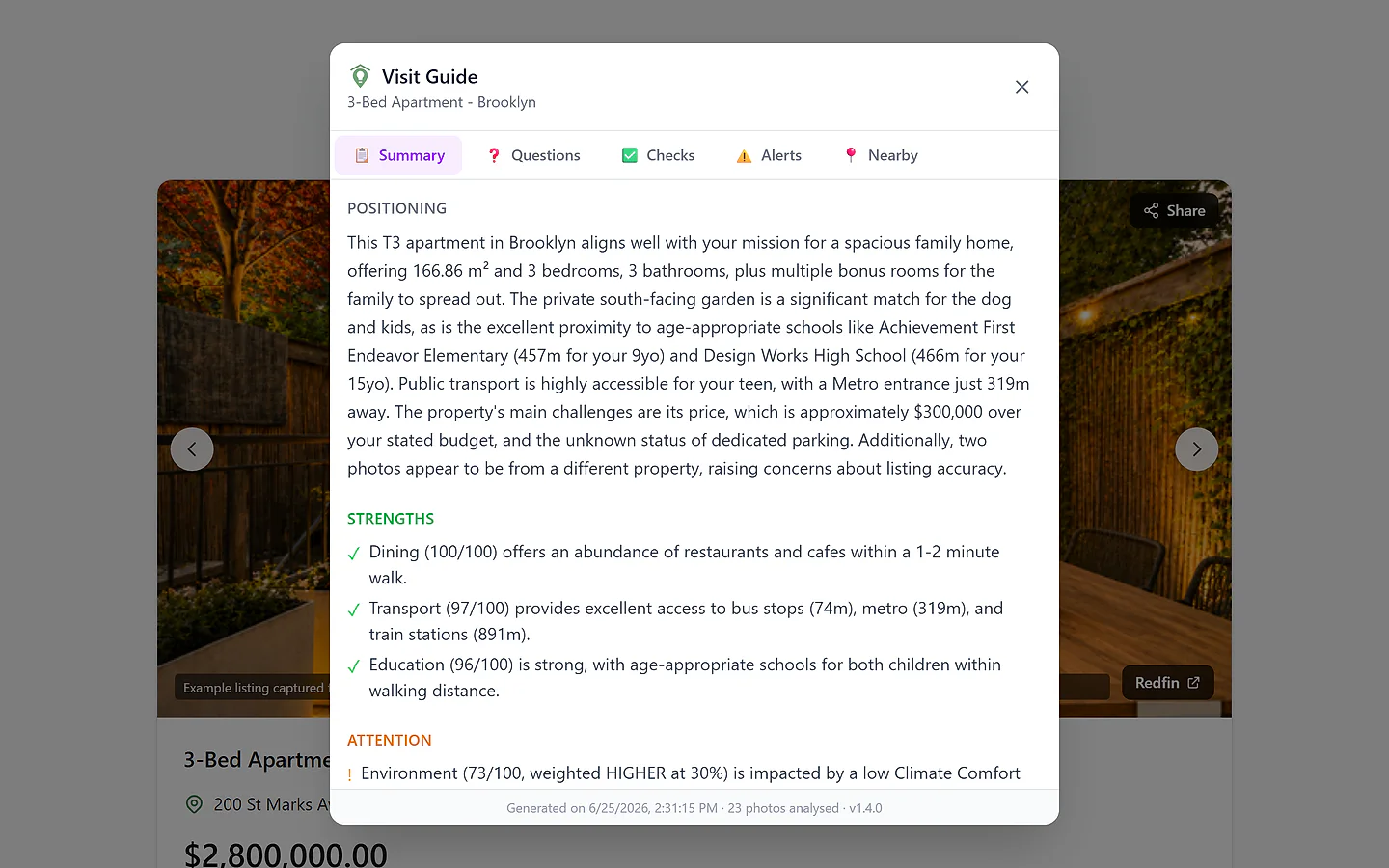
The visit, prepared
Five angles per home — with the checks ready to run on site.
Every guide is built around five angles: a summary of how the home sits against what you're looking for, the questions worth asking, the checks to run room by room, the alerts where something doesn't add up, and your key locations with travel times. Home missions only — on a Travel mission, its counterpart is the day-by-day itinerary.
Reads what you'd miss
The listing's words are checked against its own photos and data — mismatches become alerts, not surprises.
Questions with a reason
Each suggested question says why it matters — a gap in the listing, an inconsistency, or one of your own priorities.
Specific to this home
No two guides are the same: your mission's context is crossed with this home's own listing, photos and surroundings.
One guide, three moments
Built before the visit, carried during it, kept after it.
Before — prepare
Generate the guide from the home's page and read the summary, the questions and the alerts — so nothing is discovered for the first time at the door.
During — carry it
Take the questions and the room-by-room checks with you — the visit runs your agenda, not the seller's tour. On Pro, print it or save it as a PDF.
After — it stays
The guide lives on the home's page for when you weigh the decision — what you learned stays where you'll decide.
How a guide is built
Pick the home
From a scored home's page in a Home mission, one click starts the guide — ready in well under a minute.
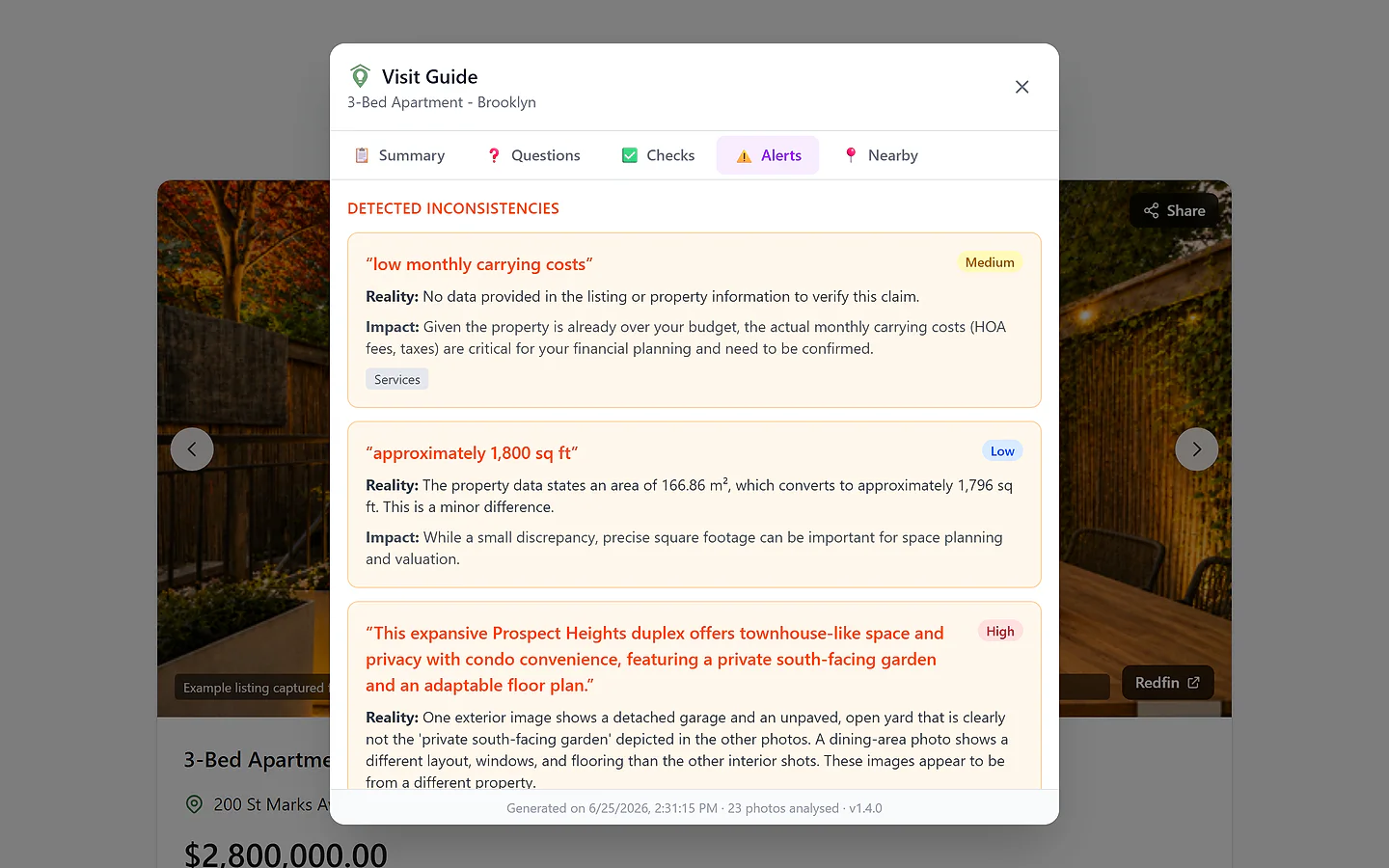
How people use it
Before the Brooklyn visit
The Martins' guide for the Redfin home at 200 St Marks Ave flags three things worth clearing in person: two photos that don't look like the same property, a floor area that doesn't quite match the listing's own data, and "low monthly carrying costs" stated nowhere in figures — which matters, because the home is already about $300K over their budget.
Result: Three vague doubts became three precise questions — answered at the visit, with the agent in the room, not discovered after an offer.
At the viewing
On site, the Martins work through the guide: is there actually dedicated parking, which the listing never states? How loud are Vanderbilt Avenue, 96 m away, and the railway behind it, on a street they chose for quiet? The checks even suggest what to photograph.
Result: The visit runs their agenda — the guide's questions and checks — not the seller's tour.
A first-time renter
Jonas is viewing his first apartment and doesn't know what he doesn't know. His guide turns the score's warnings and the listing's gaps into a room-by-room checklist — water pressure, natural light, noise at night — plus the questions a seasoned renter would ask.
Result: He shows up with a veteran's checklist on his first viewing.
See it in action
Plans & limits
| Feature | Free | Plus | Pro |
|---|---|---|---|
| Field Guide access | No | Yes · Better than Free | Yes |
| Guides (rolling 30 days) | — | 10 · Better than Free | 30 · Better than Plus |
| Photos analyzed per guide | — | 10 · Better than Free | 50 · Better than Plus |
| Guide history | — | 1 year · Better than Free | 3 years · Better than Plus |
| PDF export | — | No · Better than Free | Yes · Better than Plus |
Guides run on a rolling 30-day allowance, counted across all your missions. On a shared mission, a generation uses the plan and allowance of whoever runs it.
Works with
Questions
Why don't I see the Field Guide button?
It's a Plus and Pro feature, and it lives on Home (buy or rent) missions only — on Travel missions its counterpart is the day-by-day itinerary. Free users don't see the button; it appears on the home's page in a Home mission.
What exactly does it check in the photos?
The guide reads the listing's photos against its claims and against each other — signs like damp, inconsistencies such as a "renovated" claim beside original window frames, or images that don't appear to belong to the same property. Each alert carries a severity, so you know what to clear first.
How many guides can I generate?
Plus includes 10 and Pro 30 per rolling 30-day window, counted across all your missions — a guide generated 31 days ago no longer counts. On a shared mission, each generation uses the plan and allowance of whoever runs it.
Is the guide updated when the listing changes?
No — a guide reflects the listing at the moment it was generated, and there's currently no regeneration option. Generate it when the visit is actually in sight, so it works from the freshest version of the listing.
Can I take it with me to the visit?
Yes — the guide is always on the home's page, phone included; it's built to be used on site, not just read at a desk. Pro users can also print it or save it as a PDF from the guide's header.
Ask me anything about the Field Guide
An assistant that answers questions about this feature, in your words.
Ask in any language — we'll reply in yours.
Never visit blind again
Start free with the full womiin Score on your first listings — and bring in the Field Guide with Plus when a visit is on the calendar.