Market & mission insights
Plus & ProTwo lenses on the market: how one place sits against its neighbourhood, and how your whole search is shaping up.
What are market & mission insights?
A price on its own tells you almost nothing. The same figure can be a steal in one neighbourhood and a rip-off two streets over. Insights give you the missing half: how a listing's price sits against the real market around it, and how your whole shortlist is shaping up.
This place, against its market
Every price read against the neighbourhood — is it a good deal, or just a nice photo?
They come in two lenses. Market intelligence reads one place against its neighbourhood — a price-deviation badge on every plan, and the fuller detail (value, market heat, days on market) on Plus and Pro. Mission Insights (Pro) zooms out to your whole mission at once — the price spread, the score profile, the value map — so you can see your search, not just one listing. Both work on Home and Travel missions.
Priced in context
Every listing is measured against aggregated statistics for its own zone and type — so a good price reads as a good price, not a guess.
From one place to the whole search
Zoom from a single listing's market position out to your entire shortlist's spread — two lenses, one picture.
Independent of the listing
The comparison comes from real market data across the platform, never from what the seller chose to say about the price.
Two lenses, one market
One reads a single place; the other reads your whole search. They answer different questions.
Market intelligence is Plus & Pro (the price-deviation badge is on every plan); the whole-mission layer, Mission Insights, is Pro.
Market intelligence
One place · vs its neighbourhood
Below every listing's price, a badge tells you how it sits against the local market — is it under or over the area median? On Plus and Pro, open the detail for the fuller read: whether the quality justifies the price, how hot the local market is, and how long similar listings tend to sit.
- Price-deviation badge — under or over the area median (every plan)
- Value, market heat and days on market (Plus & Pro)
- The full market-stats view when you tap a badge (Plus & Pro; Free sees it behind a blur)
Mission Insights
Whole mission · your search at a glance
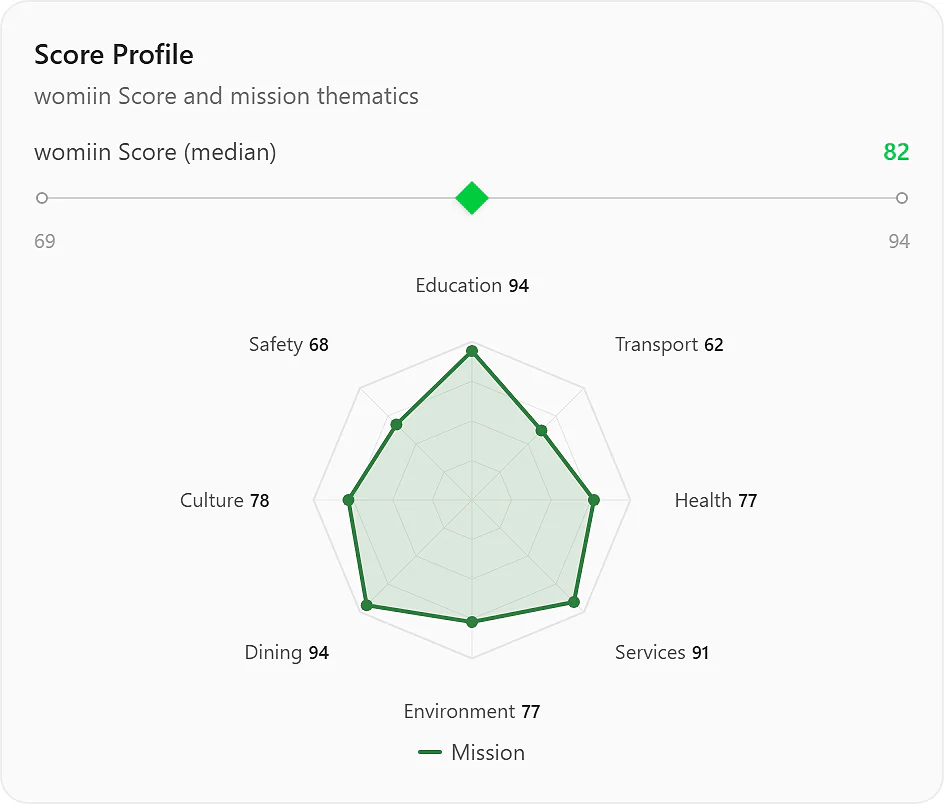
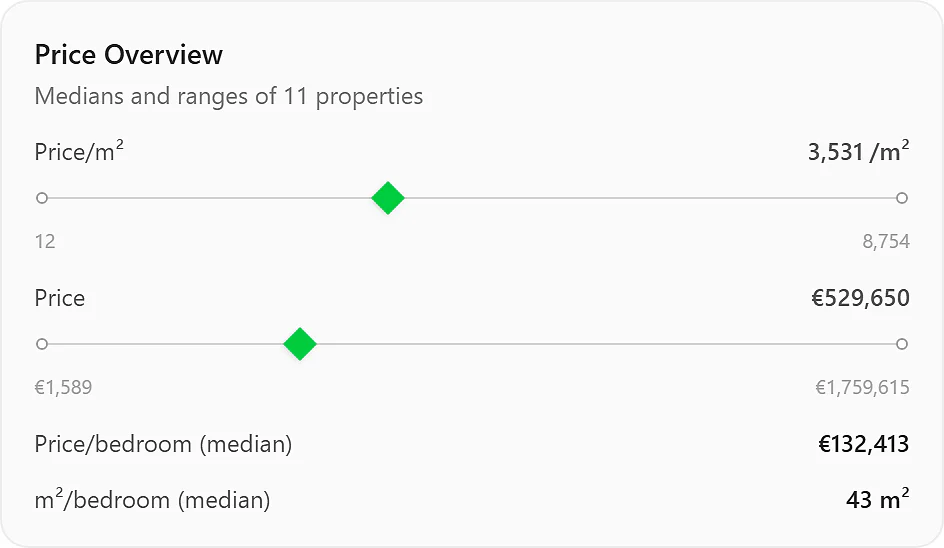
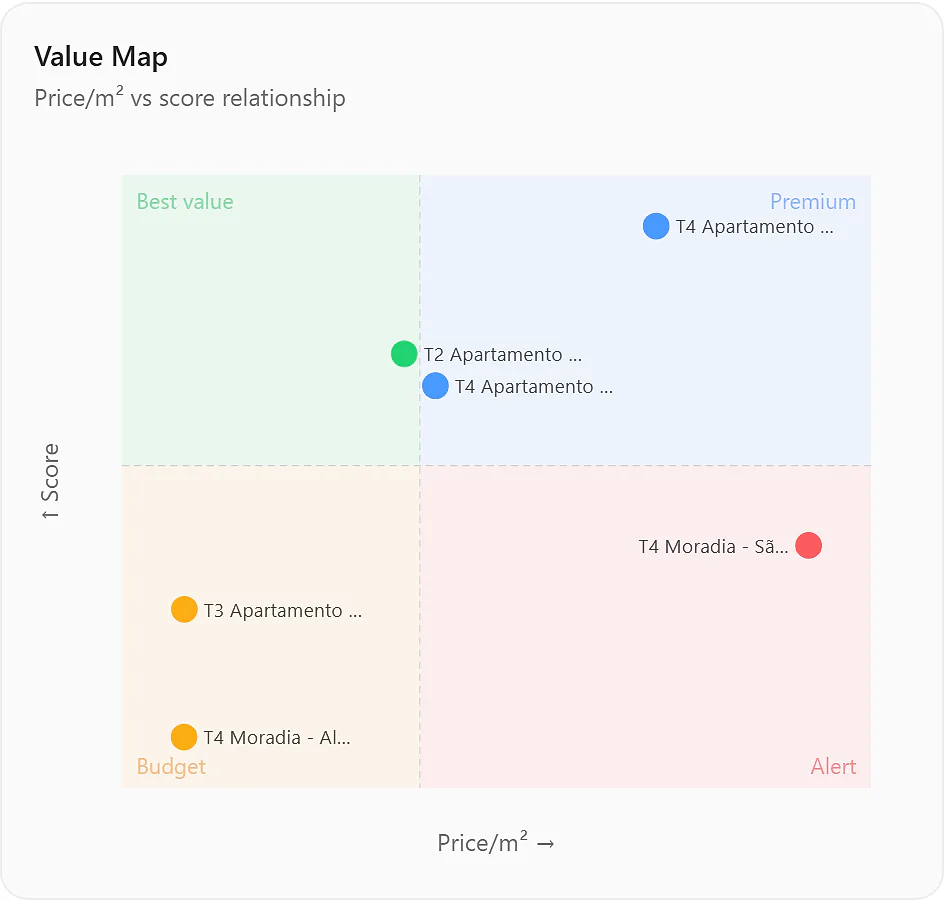
One view over every item in your mission: the price spread against the market, an eight-dimension score profile, a value map that places each listing between price and quality, and coverage of the types and areas you're looking at. It answers "how is my search going?" — not "how does this one compare?"
- Price overview + score profile across the whole mission
- Value map — each listing placed by price against quality
- Coverage of types, areas and days on market (Buy / Rent)
How the insights build up
Score the places
Both lenses start from scored listings — save and score the homes or stays in your mission, and the market data attaches to each.
How people use it
A favorite that's over the market
House hunt · NYC: the Brooklyn home the Martins love scores a strong 92 — but the badge under its price flags it well above the area median for its type. One tap opens the detail: the market's warm, and similar homes don't sit long.
Result: They fall for it with their eyes open — knowing it's priced above the neighbourhood before they make an offer.
The whole shortlist, at a glance
With a dozen homes saved, the Martins open Mission Insights. The value map places most of the shortlist in the premium corner — good, but pricey — while one quiet listing sits alone in best value: high score, below-median price.
Result: The aggregate view surfaced the one home the individual listings never made obvious.
Market context on a trip
Christmas trip · Paris: the insights work for stays too. Each of Sofia & Léo's shortlisted stays carries its own price-deviation and market-heat read for the neighbourhood, and Mission Insights lays the whole shortlist out by price per night against score.
Result: They avoid overpaying for a hot week — and see, at a glance, which stay gives the most for the money.
See it in action
Plans & limits
| Feature | Free | Plus | Pro |
|---|---|---|---|
| Price-deviation badge | Yes | Yes | Yes |
| Market-stats detail (value · heat · days on market) | No | Yes · Better than Free | Yes |
| Mission Insights (whole mission) | No | No | Yes · Better than Plus |
The price-deviation badge is on every plan; the detailed market view opens on Plus & Pro. Mission Insights is Pro and needs at least 3 items in the mission. Both lenses work on Home and Travel — days on market and typology breakdowns are Buy / Rent only.
Works with
womiin Score
Quality is half the picture — the value read weighs the score against the price.
Comparison
The side-by-side plots each finalist against the same mission median.
Negotiation Strategy
Where the price sits is the backbone of the fair-price estimate.
Missions
Mission Insights reads your whole mission — its median anchors everything.
Questions
Why do I only see the price badge on Free?
The price-deviation badge — under or over the area median — is on every plan. The fuller read (the value index, market heat and days on market) and the detailed market-stats view open on Plus and Pro; on Free, tapping a badge shows the view behind a blur with an upgrade prompt.
Where does the market data come from?
From aggregated statistics for each zone, recomputed periodically over a rolling six-month window — never from the listing itself. And it's conditional: a badge only appears once an area has enough comparable listings behind it. Where the immediate area is thin, the lookup widens to progressively larger areas around it; if none of them carries enough, no market read is shown. The womiin Score is unaffected either way — it reads the place, not the market.
What's the difference between the two lenses?
Market intelligence reads one place against its neighbourhood — "how does this listing compare?" Mission Insights reads your whole mission at once — "how is my search going?" The first is per-listing (Plus & Pro for the detail); the second is an aggregate view (Pro).
Why can't I see Mission Insights?
Mission Insights is a Pro feature, and it needs at least 3 active items in the mission to have something to aggregate. Free and Plus plans don't show the button; on Pro with fewer than 3 items, it asks you to add more.
Does this work for Travel missions?
Yes — both lenses work on Home and Travel. Travel listings show the price-deviation and market-heat reads, and Mission Insights lays them out by price per night against score. Days on market and typology breakdowns stay Buy / Rent-only, since they don't apply to short stays.
What are value, market heat, days on market and the value map?
Value weighs a listing's quality (its womiin Score) against its price versus similarly priced places nearby — so a fairly priced home can still read "pricey" if peers score higher. Market heat shows how competitive the local market is; days on market estimates how long similar listings sit. The value map (Mission Insights) plots every item by price against quality — the best-value corner is high-score, low-price.
Ask me anything about insights
An assistant that answers questions about this feature, in your words.
Ask in any language — we'll reply in yours.
See what the price really means
Start free with the full womiin Score and the price-deviation badge — and bring in the detailed market view with Plus.